
If you're comparing Boomerang and CTD, you're likely a revenue leader who's settled on the warm-intro category but needs to pick a specific vendor. Both are credible. The right pick depends on what specific problem is biggest for you.
This page is the head-to-head, written to actually help you decide. We've made our best case where Boomerang wins and we've stated honestly where CTD wins. We've also written a full CTD alternatives page for buyers who want to see the broader category context.
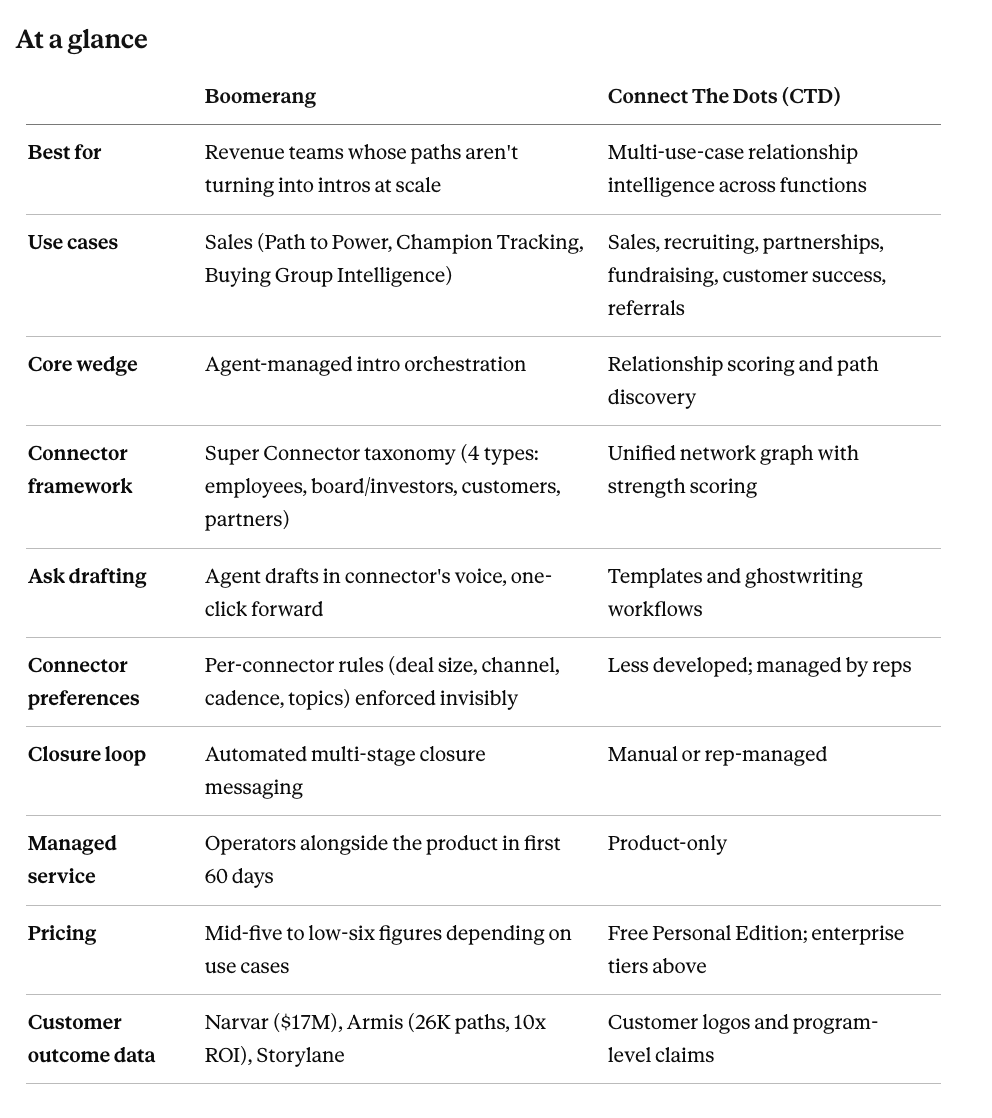
At a glance
What CTD does well
CTD is a genuinely strong product. Three places where they win clearly:
Multi-use-case breadth. CTD spans six use cases (sales, recruiting, partnerships, fundraising, customer success, referrals). If your team needs relationship intelligence across multiple functions, not just sales, CTD's coverage is unmatched in the category. Boomerang focuses on sales-side use cases (Path to Power, Champion Tracking, Buying Group Intelligence). If you want to deploy one relationship platform across your entire company, CTD is the cleaner pick.
Free Personal Edition. CTD has a free tier for individual reps and operators that lets people use the relationship discovery features without going through a procurement cycle. It's a good entry point. Boomerang doesn't have a directly equivalent free product, which means trying us requires a real sales conversation. For some buyers, that's a friction CTD doesn't impose.
Category authority through the founder voice and Who Got Me Here podcast. Drew Sechrist's background as Salesforce employee #6 gives CTD's positioning depth. Their podcast is the strongest content asset in the relationship intelligence category. If you're a buyer who's spent time listening to Who Got Me Here and finding the framing useful, you're already partially sold. We've published our own deep content (the Awkward Ask manifesto, the Super Connector Playbook, Why Boomerang), but CTD's content is older and more distributed.
What Boomerang does well
Five places where Boomerang wins:
Intro orchestration end-to-end. This is the central differentiation. Both products map relationships well. Both surface paths. CTD provides templates and ghostwriting; reps then draft, ask, and follow up. Boomerang's agent (Rudy) drafts the ask in the connector's voice, picks the moment, routes for one-click approval under the connector's preferences, escalates to managers when reps stall, and closes the loop when intros produce revenue. This is the operational layer where most warm-intro programs break, and it's where we focus our product development.
The Super Connector taxonomy. Boomerang's framework segments connectors into four distinct types: employees (weekly cadence, batched approvals), board/investors (monthly cadence, high-stakes asks), customer champions (quarterly cadence, trigger-timed), and partners (intent-driven, not time-driven). Each type has different cadences, preferences, and rules of engagement. CTD treats connectors as a unified network. For programs that activate meaningfully different connector pools, the taxonomy makes routing dramatically more accurate. We've written about the full framework here.
Connector preference enforcement. A board member can set rules like "only $500K+ deals, email only, max two asks per quarter, no portfolio competitors." Boomerang enforces these invisibly: asks that violate the rules never reach the connector. This single design choice is what keeps senior connectors engaged over years rather than burning out. CTD's preference management is less developed; this work usually falls to reps to remember manually.
Closure loop automation. When an intro produces a meeting, opportunity, or revenue, Boomerang automatically messages the connector with a specific contextual update. This is the single highest-leverage thing you can do to make the next ask easier, and it's the move most teams skip because it falls between functions. CTD treats closure as a rep-managed activity; Boomerang automates it tied to CRM stage changes.
Operators alongside the product. We ship Boomerang with people who help run the program in the first 60 days. This isn't a tool you buy and figure out alone. The managed-service component is part of the model because warm-intro programs require operational expertise most teams don't have in-house yet. CTD is product-only. For some buyers, this is preferred (less dependence). For others, the managed-service layer is what makes the first quarter actually work.
Lives in your existing stack, ships with operators. Native Salesforce, HubSpot, Outreach, Gong, and Slack. reps don't change a single workflow. And Boomerang ships with operators alongside the product for the first 60 days (program design, connector recruitment, ask routing, outcome accountability). We've built and run this at 100+ companies. Bodies, not bots.
Where the difference shows up: four different campaigns, run by agents
This is the homepage-standard differentiation, and it's the move CTD doesn't ship. Boomerang doesn't have a broader warm graph and identical activation. we run four different warm-intro motions, one per connector type, because an investor intro is not a customer intro is not a partner intro.
Executives & employees. cadence ~1 ask per week each. Aligned by comp and culture. Rudy asks directly via Slack DM, batched. One-click approval. "Tom. 3 quick intros to review for next week's pipeline. Each is under 30 seconds."
Board, investors & advisors. cadence ~1 ask per month each. Equity-aligned but time-scarce. High-stakes asks only with full deal context. The investor warm intro routes through the Chief of Staff for CEO approval before reaching the board member. Never a cold ping. "$500K opp at Airbus; board member at Goldman knows their CIO from a 2019 deal."
Customer champions. cadence ~2-3 asks per year each. Trust-aligned. Framed to make them look good, timed after a positive trigger (QBR, launch, press hit). Reps can name-drop directly OR have Rudy ask the CSM to ask the customer. Rudy handles the handoff. "Jamie's launch went well last week. perfect time to ask her about Stripe."
Partners. cadence intent-triggered, not time-triggered. Incentive-aligned by revenue share or ecosystem fit. Rudy maps the partner network privately and asks only when a real intent signal fires. "Saw $750K intent at Airbus. you mentioned a strong relationship with their CFO last quarter."
And Rudy doesn't wait for the rep. If a six-figure opportunity has a clear warm path through any pillar and the rep hasn't asked in five days, Rudy escalates to the manager. protecting deals from rep hesitation. Every workflow is MCP-able, plug it into Claude, Clay, or your custom agent stack.
The buyer profile decision
Here's how we'd advise picking between us in specific scenarios:
Pick CTD if:
- You want one relationship platform across sales, recruiting, partnerships, fundraising, customer success.
- You want a free entry point for individual reps to try the product.
- You're earlier-stage and want lightweight relationship intelligence without managed-service overhead.
- Your team has the operational expertise to run a warm-intro program in-house.
Pick Boomerang if:
- Your specific bottleneck is "we have paths and they're not turning into intros."
- You've tried running warm-intro programs before and watched them stall on manual execution.
- You want connector preferences enforced invisibly rather than depending on rep discipline.
- You want managed-service operators alongside the product for the first 60 days.
- You're activating board members, investors, and customer champions and need cadence-aware orchestration.
Pick both (some customers do, for different layers):
- CTD for cross-functional relationship discovery (sales + recruiting + partnerships).
- Boomerang for the intro orchestration motion on the sales-specific side.
The deeper difference
Beyond the feature-by-feature comparison, there's an architectural difference worth surfacing.
CTD is a data platform. They map relationships exceptionally well across multiple use cases. The output is a relationship graph and a set of paths. Reps then act on the paths, with templates and workflows to help.
Boomerang is the orchestration layer. We map relationships too (with parity on the discovery layer), but our product focus is what happens next: the agent runs the asking, routing, escalation, and closure mechanics. The output is booked meetings, not just surfaced paths.
This isn't a feature difference. It's a different architectural choice about who does the work. CTD bets that good data and good templates get reps to ask. Boomerang bets that the work happens at scale only when an agent handles the social and cognitive load.
Both bets are defensible. The right one for your team depends on whether your reps have demonstrably consistent warm-intro asking discipline (in which case CTD's discovery is plenty), or whether warm-intro asking has been historically inconsistent regardless of tooling (in which case orchestration is the actual bottleneck).
We've made the longer version of this argument in our manifesto.
A note on customer outcome data
When comparing vendors in this category, we recommend asking each for three specific named customer outcomes with revenue impact attached. The answers are often telling.
Boomerang publishes specific, named, verifiable outcomes:
- Armis: 26,000 warm intro paths activated, 10x ROI
- Storylane: significant PLG-to-enterprise expansion acceleration
CTD has customer logos and program-level claims. Their public outcome specificity is less explicit. We'd push them on this during evaluation. They may have great answers; the data just isn't as publicly available.
What this comparison usually misses
Three things buyers should know:
One. The CTD vs Boomerang choice is rarely about feature parity. Both products are well-built within their respective architectures. The choice is about what bottleneck you're trying to solve. If you've already named your bottleneck honestly, the right answer is usually obvious.
Two. Both products integrate with the major CRMs (Salesforce, HubSpot) and the standard sales stack (Outreach, Salesloft, Gong). Integration depth is roughly comparable. Don't make this comparison about technical fit unless you have a specific edge-case requirement.
Three. Total cost of ownership matters. CTD's free Personal Edition + lower-tier enterprise pricing is real cost savings for some teams. Boomerang's higher price comes with managed-service operators in the first 60 days, which has real value when the alternative is "buy a tool and let it sit." Pick based on what you'll actually use, not just nominal seat cost.
Bottom line
Boomerang and CTD are both legitimate options in the relationship intelligence category. They solve overlapping but distinct problems.
CTD maps relationships. Boomerang runs the warm-intro motion. drafted, routed, approved, tracked. Different layer.
If your problem is multi-use-case relationship intelligence across functions, pick CTD.
If your problem is intro orchestration that turns mapped paths into meetings at scale, pick Boomerang.
If you're still unsure, the diagnostic is: have your reps demonstrably and consistently asked for warm intros when surfaced the opportunity to? If yes, CTD's discovery layer is sufficient. If your reps have been inconsistent (which is the case for most teams), the orchestration layer is what changes the math.
Book a Boomerang demo if you want to walk through this on your real pipeline. We'll tell you honestly when CTD is the better fit and point you to them if so.
See our broader category argument: Why Boomerang.Read the full CTD alternatives breakdown for the broader competitive context.Customer outcomes: Armis, Storylane and others.
Frequently asked questions
What's the difference between Boomerang and Connect The Dots (CTD)?
Boomerang and CTD solve adjacent problems in the relationship intelligence category. CTD is a data platform that maps relationships exceptionally well across six use cases (sales, recruiting, partnerships, fundraising, customer success, and referrals). The output is a relationship graph and a set of paths. Boomerang is the orchestration layer. We focus on what happens after paths are surfaced: our agent Rudy drafts the intro request in the connector's voice, routes for one-click approval, escalates when reps stall, and closes the loop when intros produce revenue. CTD is broader. Boomerang is deeper on sales-specific orchestration.
Should I pick Boomerang or CTD?
Pick CTD if you want one relationship platform across sales, recruiting, partnerships, and customer success, or if you want a free entry point for individual reps to try the product. Pick Boomerang if your specific bottleneck is having warm paths that aren't turning into intros, if you've tried running warm-intro programs and watched them stall on manual execution, or if you want connector preferences enforced invisibly rather than depending on rep discipline. Some teams use both: CTD for cross-functional relationship discovery and Boomerang for the intro orchestration motion on the sales side.
Does CTD have a free version?
Yes. CTD offers a free Personal Edition for individual reps and operators that lets people use the relationship discovery features without going through a procurement cycle. It's a real entry point and a friction-removing move that Boomerang doesn't currently match. Boomerang's model assumes you're evaluating us at the team level, which requires a sales conversation. For early-stage buyers or individual contributors who want to try a product before involving procurement, CTD is the cleaner pick.
What is Boomerang's Super Connector taxonomy?
Boomerang segments connectors into four distinct types, each with different cadences and rules of engagement. Employees and executives can handle roughly one ask per week, batched through Slack DM with one-click approval. Board members and investors get roughly one ask per month with full deal context, often routed through the Chief of Staff for approval. Customer champions handle two to three asks per year, trust-aligned and timed after a positive trigger like a QBR, launch, or press hit. Partners run on an intent-triggered cadence, mapped privately and asked only when a real intent signal fires. CTD treats connectors as a unified network. Boomerang's taxonomy makes routing more accurate for programs that activate meaningfully different connector pools.
Does Boomerang come with services or just software?
Both. Boomerang ships with operators who help run the program alongside the product for the first 60 days. This is part of the model because warm-intro programs require operational expertise most teams don't have in-house yet. The operators help with program design, connector recruitment, ask routing, and outcome accountability. CTD is product-only, which some buyers prefer because it means less vendor dependence. For others, the managed-service layer is what makes the first quarter actually work. Boomerang has built and run this motion at over 100 companies.
What customer outcomes has Boomerang published?
Two specific named outcomes. Armis activated 26,000 warm intro paths and reported 10x ROI in their first year on Boomerang. Storylane uses Boomerang to operationalize their customer network for PLG-to-enterprise expansion acceleration. When comparing vendors in this category, we recommend asking each for three specific named customer outcomes with revenue impact attached. CTD has customer logos and program-level claims; their public outcome specificity is less explicit. Push them on this during evaluation. They may have great answers; the data just isn't as publicly available.


.png)


