


Impact Delivered
- 3x the close rate: nearbound deals close at 3x the rate of outbound and qualify 2.5x as often, over 1mind’s last 120 days of closed opportunities.
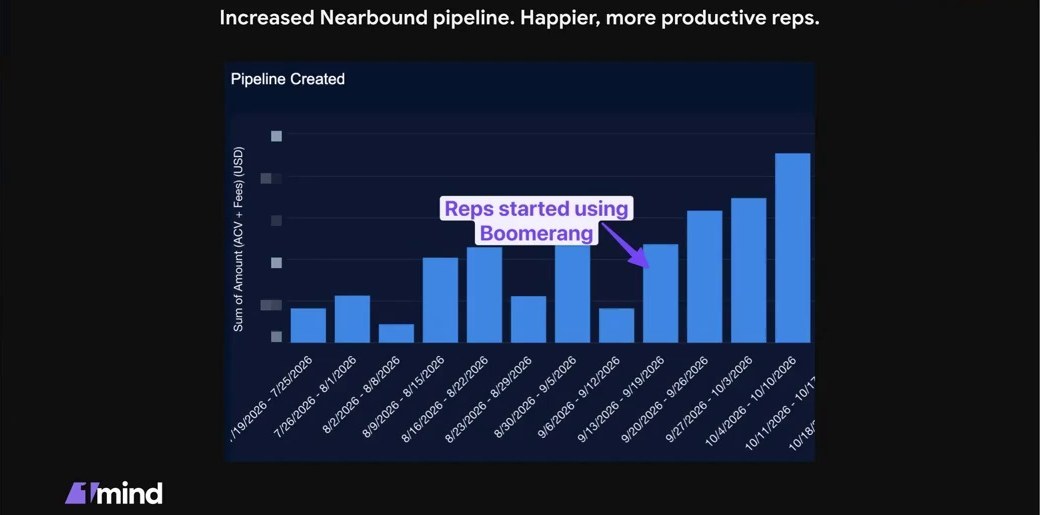
- Record pipeline weeks: weekly pipeline created has trended up since reps started using Boomerang in mid-September 2026.
- All 15 AEs on one system: warm paths that a few reps were finding by hand are now mapped for every target account.
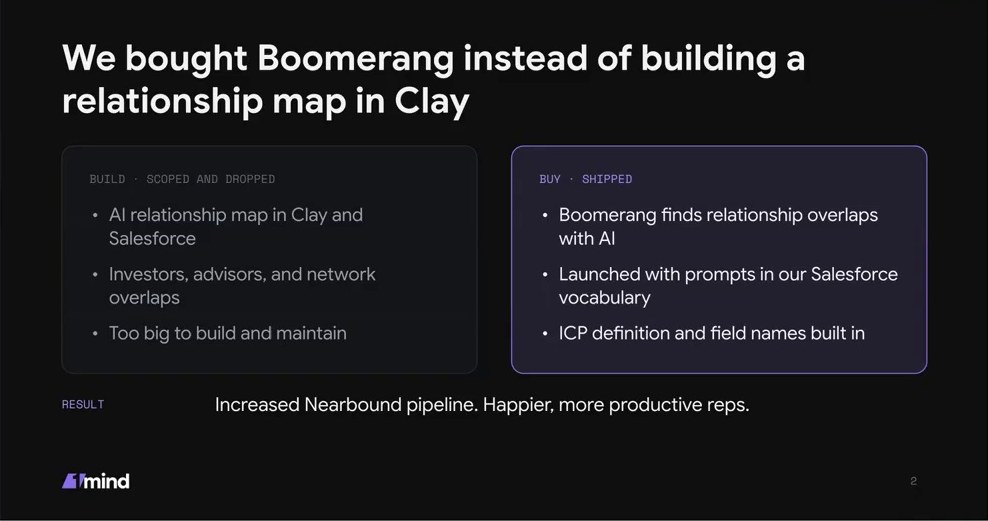
- No homegrown tool to maintain: RevOps bought instead of building a relationship map in Clay and Salesforce.
“We’re seeing good results using Boomerang to help surface those paths into accounts, and then reps are actioning that. And it’s helping us drive record pipeline weeks over the last few weeks since we implemented Boomerang.”
Josh Carter, Head of Revenue Operations, 1mind
Context
1mind sells AI “go-to-market superhumans” that qualify, demo and support buyers on the website, in the product and on live calls. Its customers are enterprise tech companies. The company raised its Series A last year, and there is no SDR team: 15 AEs source their own opportunities, so every hour they spend on pipeline generation has to count.
Problem
Breaking into enterprise accounts gets harder every year. Inboxes are full of AI-written outbound, and buyers have stopped answering it.
“Breaking into those accounts is very difficult. And it’s increasingly more difficult running outbound against those accounts than it was five years ago, even a few years ago.”
Josh Carter, Head of Revenue Operations, 1mind
Josh’s data already showed where to focus. 1mind groups pipeline into four sources. In the last 120 days of closed opportunities, nearbound (relationships and referrals) beat every other source on both qualification and close rate.
| Nearbound compared with | Qualification rate | Close rate |
|---|---|---|
| Events | 14% higher | 15% higher |
| Inbound | 44% higher | 88% higher |
| Outbound | 2.5x higher (+150%) | 3x higher (+200%) |
Relationship-driven pipeline is 1mind’s most efficient channel, and a higher qualified rate drives higher close rates. Some reps had already worked this out. They built their own spreadsheets of paths into accounts, cross-referenced 1mind’s advisor list against their LinkedIn mutuals, and used Claude to sift through what they found. It worked, but it was manual and only a few reps did it.
“It was working for them. But we just had no way of scaling it up.”
Josh Carter, Head of Revenue Operations, 1mind
Build vs Buy
Josh is a Clay power user and uses it to teach students of Pavilion’s AI in GTM School, so building it himself was the obvious first move. He scoped an AI relationship map in Clay and Salesforce covering investors, advisors and network overlaps, then dropped it. A real relationship graph needs much more than a one-off scrape:
- LinkedIn profiles re-scraped on a schedule
- Job histories tracked to find where people overlapped
- Engagement tracked across accounts: likes, comments and recommendations
- A data warehouse to hold all of it
- A UI reps would actually use, which he would then have to maintain
Sales Navigator mutual connections were a good V1, and reps used them. But a LinkedIn connection is only one kind of relationship.
“I realized, this is going to be really hard. Not only really hard to build, but I’ve got to maintain this. And on top of the data model, I need to maintain a UI that the reps use. Now here I am managing a product when I should be doing more strategic work.”
Josh Carter, Head of Revenue Operations, 1mind
The aha moment came when he saw Boomerang show every path into an account straight away.
How 1mind Runs Nearbound with Boomerang
Boomerang maps 1mind’s whole network against its target accounts, and reps act on the strongest path.
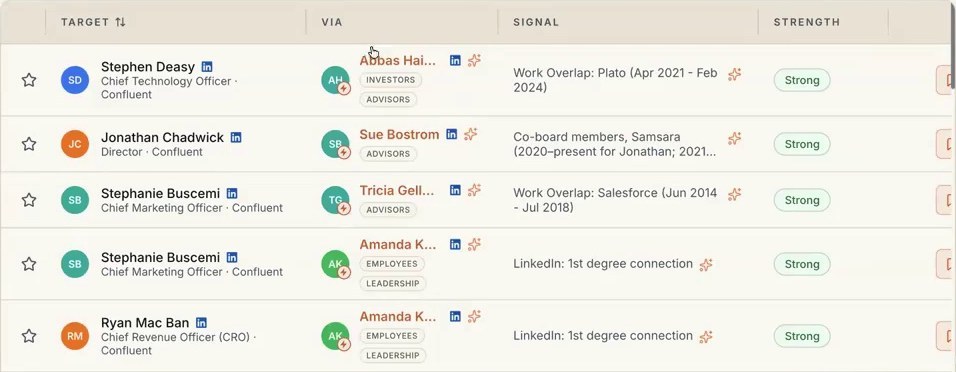
- Map the paths. For each account, Boomerang shows the target person, who can reach them and the evidence. Paths come from investors, advisors, employees, leadership and customer champions. The evidence includes past work overlap, sitting on the same board and first-degree LinkedIn connections. Each path is rated by strength.
- Stack it with intent signals. Josh runs a signals library in Clay, which tracks things like how many sales engineers an account is hiring and its SE-to-AE ratio. An account with three warm paths and a live need is the one to work first.
- Use the path. Reps either ask the connector for a referral or mention the shared connection in their outreach. Either way, the message is personal and relevant.
- Meet reps where they work. The signals live in Salesforce and reach reps through Slack and Salesloft cadences, not another tab to check.
“A signal can be: you’ve got three paths into this account through these advisors and these investors or these customer champions. This is a really warm account to go after, and they also have a need for your product.”
Josh Carter, Head of Revenue Operations, 1mind
Josh showed this live in the webinar. He searched Confluent in Boomerang and got 44 paths, through investors, advisors, employees and champions. A Sales Navigator mutuals list only shows LinkedIn connections.
Results
Reps started using Boomerang in mid-September 2026. Weekly pipeline created (ACV plus fees) has trended up since, and the latest weeks are the highest on Josh’s chart.
- More nearbound pipeline. That’s 1mind’s highest-qualifying, highest-closing source.
- No product to maintain. RevOps went back to forecasting and strategy instead of running a homegrown graph and UI.
- Happier, more productive reps. Fewer activities, each one worth more.
What the reps said
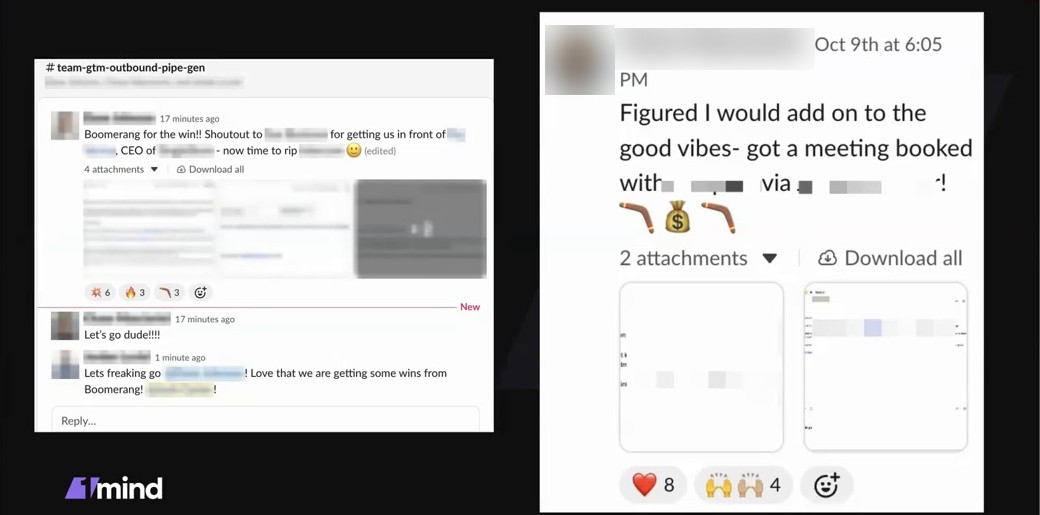
The wins went straight into 1mind’s sales Slack:
“Boomerang for the win!! Shoutout to [colleague] for getting us in front of [prospect], CEO of [company].”
AE, 1mind
“Love that we are getting some wins from Boomerang!”
Sales team member, 1mind
“Figured I would add on to the good vibes: got a meeting booked with [prospect] via [connector]!”
AE, 1mind
Josh’s Advice to RevOps Leaders
- Let the data choose the project. Find the pipeline source that qualifies and closes best, then build for more of it. For 1mind, that was nearbound.
- Reverse-engineer your best reps. Hold regular sessions with the people who source pipeline well, then scale what they do by instinct.
- Stack signals. Combine a relationship path with a real need and a reason to reach out now. The goal is fewer touches that each matter more.
- Buy what you’d have to maintain forever. If the tool needs constant data refreshes and a UI reps depend on, building it turns RevOps into a product team.
“Talk to your sellers. Hear the words of the actual rep, understand their process, and then back into the things that are going to help you.”
Josh Carter, Head of Revenue Operations, 1mind
“Everybody’s been doing this since the dawn of time: who do you know, can you help me break into an account? But nobody’s systematized this and created a context graph of people that can help connect you. Nobody’s done that until Boomerang.”
Josh Carter, Head of Revenue Operations, 1mind
