Product / Capabilities / Relationship scoring
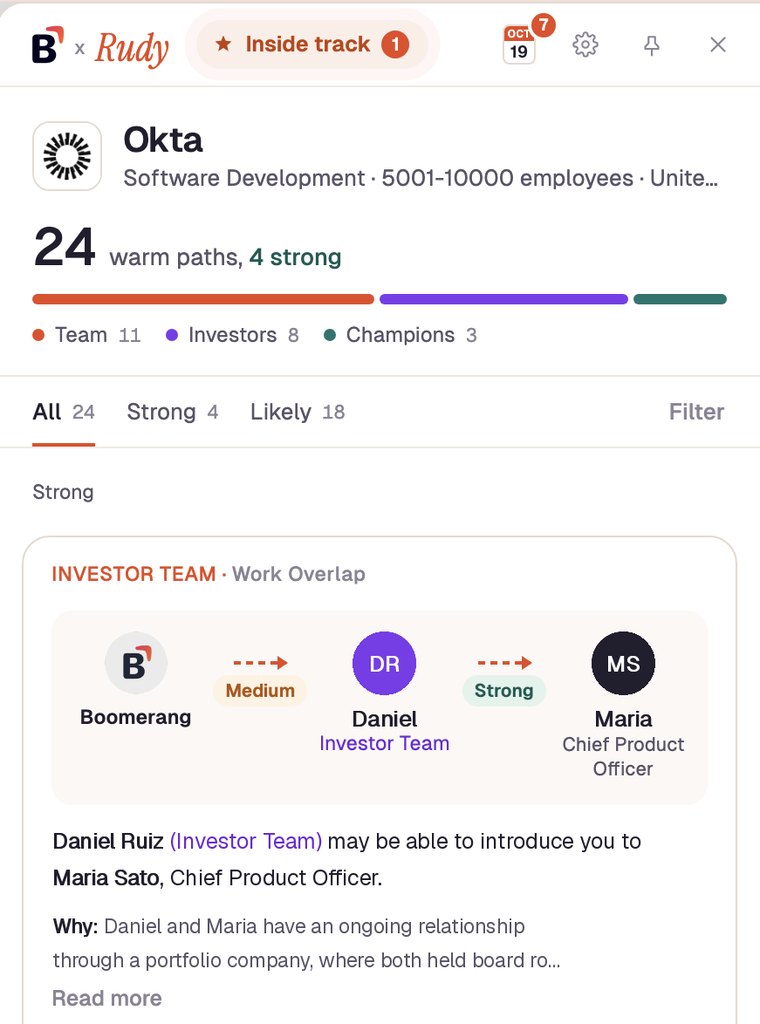
Relationship scoring is how Boomerang decides which warm path into an account is worth using. Rudy, Boomerang's AI agent, reads 80+ relationship signals and weights each one by the connector's persona, seniority and department fit with the buyer, and by how strong the tie actually is.
7-day free trial on Starter, no card. Every plan.
Work overlap: same security org, four years Strong tie
Same function: security leaders know each other Weighted up
Seniority: CISO to CSO, peers Weighted up
Recent contact: commented on her post, 11 days ago Active
Shared employer only: 212 other people Ignored
Capability 0.93 × Willingness 0.95 = 88 Ask through her CSM
Illustrative example. People are invented; the numbers show the method, not a customer result.
How it works
Work and board overlaps, calendars, CRM history, social engagement, schools, patents, publications and more, from signals your company already has.
Each signal is weighted by persona, seniority and department, because some functions stay close at any company size and others never meet.
Shared employer only, shared fund only and other crowd overlaps are ignored on their own, so the list is not padded with weak ties.
Paths are ranked on capability times willingness and sorted into Strong, Likely and Long shot, each with a one-line story and a Why.
In the field
Armis
“Driving sustainable growth by tapping into our customers and relationship networks is definitely something we’re doubling down as a key strategy for us.”Jason Mead, SVP Global Business Operations & Customer Team, Armis
Plans
Scoring runs on every plan. What changes by plan is how many connectors are mapped: 50 on Starter, 300 on Team, 1,500 on Company, unlimited on Enterprise. Full details on pricing.
Starter✓
Scored warm paths on every account, with relevance bands
Team✓
Everything in Starter, plus ask Rudy across your whole book in Slack
Company✓
Everything in Team, plus Sentient mode
Enterprise✓
Custom
Keep going
Questions
Rudy reads 80+ relationship signals and weights each by the connector's persona, seniority and department fit with the buyer, and by how strong the tie actually is. Paths are then ranked on capability times willingness: can this person get the meeting, and will they ask.
Because an overlap is not a relationship. A hundred people who passed through one company are not a hundred relationships, so a shared employer or a shared investor alone does not count as a warm path.
Every Super Connector gets a High, Medium or Low relevance band with a plain-English reason, so you know which connector to ask first. Power Users and your own team get relevance bands too.
They group warm paths by strength. Rudy on Chrome shows All, Strong, Likely and Long shot tabs with exact path totals, and the Accounts tab has a Strength filter so you can see which accounts you can reach first.
No. Scoring runs on every plan. Plans differ by how many connectors are mapped: 50 on Starter, 300 on Team, 1,500 on Company and unlimited on Enterprise.
Start on Starter with a 7-day free trial, no card. Team and Company start with a setup call: about 60 minutes of technical setup, graph in under a day, full go-live in about a week.
Last updated 2 November 2026. Plan details match the pricing page.

Rudy, our AI referral agent, finds the warm path, drafts the ask for the right person to send, and tracks it to the meeting.
